Shared Types for NestJS, Svelte, and a Telegram Bot in a Docker-Based Application
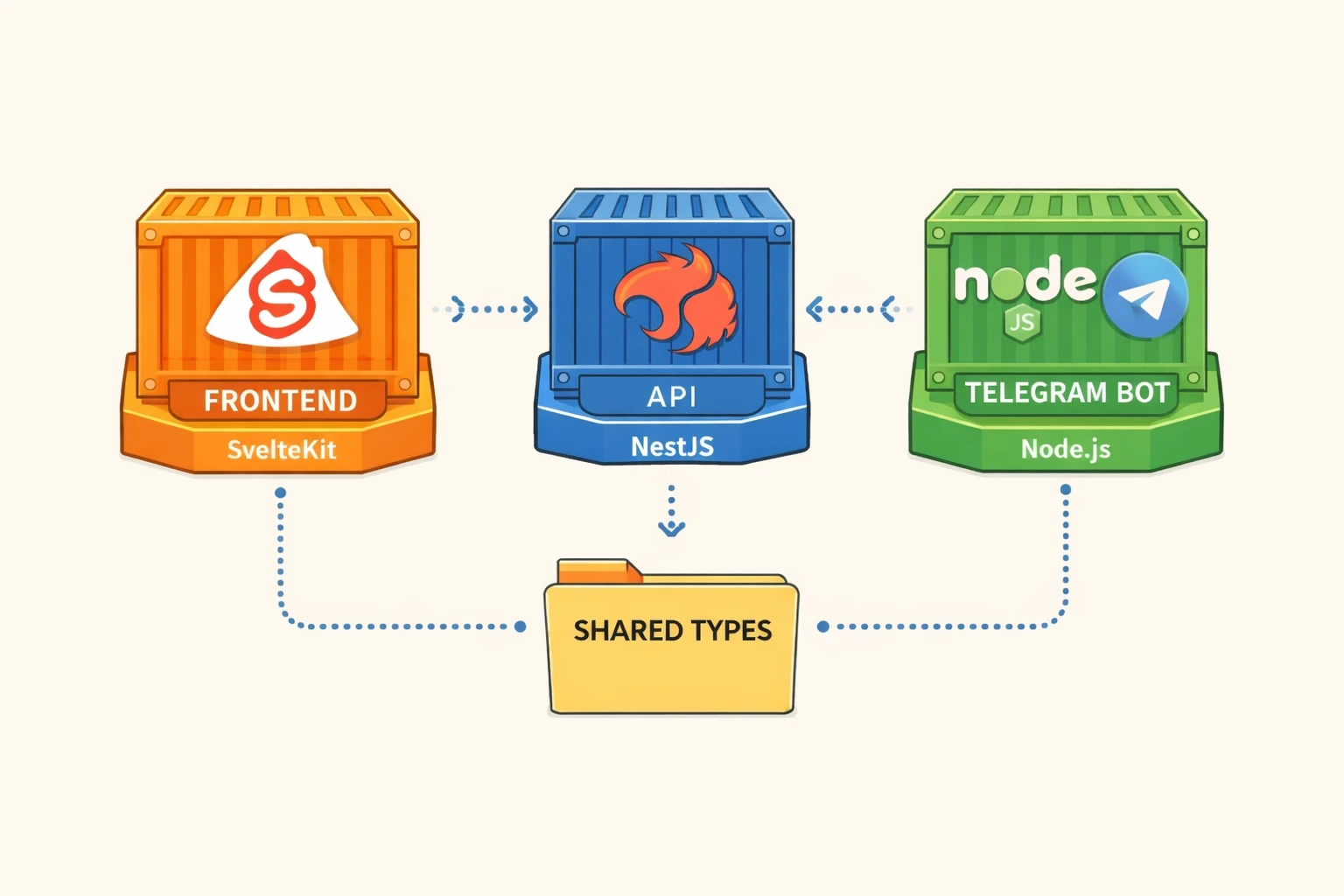
Problem
When an application has an API and multiple clients, the following needs arise:
- Generating API types on demand into a separate directory that is shared by all clients, in order to avoid code duplication and maintain a single source of truth.
- The shared folder/package must be usable both during development and in production builds inside Docker containers.
Project structure
app/
├── api/
│   ├── src/
│   ├── Dockerfile
│   ├── package.json
│   └── tsconfig.json
├── frontend/
│   ├── .svelte-kit/
│   ├── tsconfig.json
│   ├── src/
│   ├── Dockerfile
│   ├── api_client/             sym.link  - -|
│   ├── svelte.config.js                     |
│   ├── package.json                         |
│   └── tsconfig.json                        |
├── bot/                                     |
│   ├── src/                                 |
│   ├── Dockerfile                           |
│   ├── package.json                         |
│   └── tsconfig.json                        |
├── shared/                                  |
│   ├── api_client/             <- - - - - - |
│       ├── src/
│           ├── api/
│               ├── types/
│               └── index.ts
│       ├── package.json
│       └── tsconfig.json
├── docker-compose.dev.yml
└── docker-compose.yml
Docker Compose
An important detail is that services must be built with the project root as the Docker build context.
This is required because in production builds the shared/api_client directory must be copied into the Docker image.
For security reasons, Docker does not allow copying files located outside the build context. In this case, shared/api_client is one level above the frontend and bot service directories.
docker-compose.dev.yml:
services:
    frontend:
        build:
            context: .
            dockerfile: ./frontend/Dockerfile
            target: dev
        ports:
            - '3000:3000'
        volumes:
            - ./frontend:/app
            - ./shared/api_client:/app/api_client:delegated
            - /app/node_modules
        env_file:
            - .env
        depends_on:
            - api
        networks:
            - network
        stdin_open: true
        tty: true
        command: ['yarn', 'dev', '--host']

    api:
        build:
            context: ./api
            target: dev
        env_file:
            - .env
        volumes:
            - ./api:/app
            - /app/node_modules
        ports:
            - '8080:8080'
        networks:
            - network

    bot:
        build:
            context: .
            dockerfile: ./bot/Dockerfile
            target: dev
        env_file:
            - ./bot/.env
        depends_on:
            - api
        volumes:
            - ./bot:/node/app
            - ./shared/api_client:/node/shared/api_client:delegated
            - /node/app/node_modules
        ports:
            - '8081:8081'
        networks:
            - network

networks:
    network:
        driver: bridge
In development mode, volumes are used. In production, shared/api_client is copied into the image.
frontend/Dockerfile:
FROM node:22-alpine AS dev

WORKDIR /app

COPY frontend/package.json frontend/yarn.lock ./

RUN yarn install --frozen-lockfile

EXPOSE 3000

CMD ["yarn", "dev", "--host"]


FROM node:22-alpine AS build

WORKDIR /app

COPY frontend/package.json frontend/yarn.lock ./

RUN yarn install --frozen-lockfile

COPY frontend/ .
COPY shared/api_client ./api_client

RUN yarn prepare

RUN yarn build


FROM node:22-alpine as prod

WORKDIR /app

RUN addgroup -S appgroup && adduser -S appuser -G appgroup

COPY --chown=appuser:appgroup --from=build /app/build ./build

COPY --chown=appuser:appgroup frontend/package.json frontend/yarn.lock ./

RUN yarn install --production --frozen-lockfile &&
    yarn cache clean &&
    apk add --no-cache curl

EXPOSE 3000

USER appuser

CMD ["node", "build/index.js"]
bot/Dockerfile:
FROM node:22-alpine AS dev

WORKDIR /node

COPY bot/package.json bot/yarn.lock bot/tsconfig.json bot/.env ./

RUN yarn install --frozen-lockfile

WORKDIR /node/app

EXPOSE 8081

CMD ["sh", "-c", "yarn dev"]


FROM node:22-alpine AS build

WORKDIR /node/app

COPY bot/package.json bot/yarn.lock bot/tsconfig.json ./

RUN yarn install --frozen-lockfile

COPY bot/ .
COPY shared/api_client ../shared/api_client

ARG API_URL
ENV API_URL=$API_URL

RUN yarn build

EXPOSE 8081


FROM node:22-alpine as prod

WORKDIR /node/app

RUN addgroup -S appgroup && adduser -S appuser -G appgroup

COPY --chown=appuser:appgroup --from=build /node/app/dist ./dist

COPY --chown=appuser:appgroup bot/package.json bot/yarn.lock ./

ARG API_URL
ENV API_URL=$API_URL

RUN yarn install --production --frozen-lockfile &&
    yarn cache clean

EXPOSE 8081

USER appuser

CMD ["node", "dist/index.js"]
NestJS API
NestJS provides the official @nestjs/swagger library, which allows generating Swagger (OpenAPI) documentation dynamically.
In main.ts, the endpoint must be configured so that shared/api_client can fetch the up-to-date schema.
import { NestFactory } from '@nestjs/core';
import { AppModule } from './app.module';
import { DocumentBuilder, SwaggerModule } from '@nestjs/swagger';
import { NestExpressApplication } from '@nestjs/platform-express';

async function bootstrap() {
    const app = await NestFactory.create<NestExpressApplication>(AppModule);

    const config = new DocumentBuilder()
        .setTitle('My API')
        .setDescription('Your API description')
        .setVersion('1.0')
        .addBearerAuth()
        .build();

    const document = SwaggerModule.createDocument(app, config);
    SwaggerModule.setup('api-docs', app, document, {
        jsonDocumentUrl: 'swagger/json'
    });

    app.setGlobalPrefix('api');
    await app.listen(process.env.PORT ?? 8080);
}

bootstrap();
All DTOs and schemas that should be included in the shared folder must be properly annotated.
Example: create-user.dto.ts:
import { ApiPropertyOptional } from '@nestjs/swagger';
import { IsOptional, IsString } from 'class-validator';

export class CreateUserDto {
    @ApiPropertyOptional({
        description: 'User name'
    })
    @IsOptional()
    @IsString()
    userName?: string;
}
shared/api_client
This is a small application that generates API types using a generate script in the package.json.
{
    "name": "api_client",
    "version": "0.0.1",
    "description": "Shared API client",
    "main": "src/api/index.ts",
    "type": "module",
    "scripts": {
        "generate": "openapi --input http://localhost:8080/swagger/json --output src/api/types",
        "format": "prettier --write ."
    },
    "devDependencies": {
        "@eslint/js": "^9.39.2",
        "openapi-typescript-codegen": "^0.29.0",
        "prettier": "^3.6.2",
        "typescript-eslint": "^8.51.0"
    },
    "exports": {
        ".": "./src/api"
    }
}
In addition to types, request logic is implemented here:
import type { UserResponseDto, CreateUserDto, UpdateUserDto } from './types/index.js';
import { HttpClient } from './types.js';

export const usersApi = (api: HttpClient) => ({
    async getOneByTgId(id: number): Promise<UserResponseDto> {
        return await api.get(`/users/${id}`);
    },

    async create(data: CreateUserDto): Promise<UserResponseDto> {
        return await api.post('/users', data);
    },

    async update(id: string, data: UpdateUserDto): Promise<UserResponseDto> {
        return await api.patch(`/users/${id}`, data);
    }
});
Each API consumer creates its own Axios instance:
import axios from 'axios';
import { userApi } from '$api';

export const apiClient = axios.create({
    baseURL: import.meta.env.VITE_API_URL ?? '/api'
});

const user = await userApi(apiClient).getOneByTgId('1');
Types are used in both browser (frontend) and server (bot) environments. The package is not built, but must work in both development and production modes, which imposes important constraints.
Minimal tsconfig.json:
{
    "compilerOptions": {
        "target": "es2023",
        "strict": true,
        "moduleResolution": "nodenext"
    }
}
moduleResolution: "nodenext" is required so that all imports use .js extensions and importing directories without extensions is disallowed.
This works for browser applications but is mandatory for Node.js ESM according to the ECMAScript module standard.
To catch invalid imports early in the IDE, ESLint rules were added. The key rule is import/extensions:
import eslint from '@eslint/js';
import tseslint from 'typescript-eslint';

export default tseslint.config(eslint.configs.recommended, ...tseslint.configs.recommended, {
    files: ['src/**/*.ts'],
    languageOptions: {
        parser: tseslint.parser,
        parserOptions: {
            project: './tsconfig.json'
        }
    },
    rules: {
        'import/extensions': ['error', 'always'],
        'import/no-useless-path-segments': ['error', { noUselessIndex: false }]
    }
});
Importing .ts extensions requires enabling allowImportingTsExtensions, which in turn requires noEmit or emitDeclarationOnly.
This makes production builds impossible, as only type declarations would be emitted without JavaScript files.
Frontend (SvelteKit)
In SvelteKit, path aliases are configured in svelte.config.js, which generates .svelte-kit/tsconfig.json.
Minimal svelte.config.js:
const config = {
    kit: {
        alias: {
            $apiClient: path.resolve('./src/api/*'),
            $api: path.resolve('./api_client/src/api/')
        }
    }
};
The root tsconfig.json extends the generated one:
{
    "extends": "./.svelte-kit/tsconfig.json",
    "compilerOptions": {
        "allowImportingTsExtensions": true,
        "allowJs": true,
        "checkJs": true,
        "esModuleInterop": true,
        "forceConsistentCasingInFileNames": true,
        "resolveJsonModule": true,
        "skipLibCheck": true,
        "sourceMap": true,
        "strict": true,
        "moduleResolution": "bundler"
    }
}
This is sufficient for the application to see api_client inside the Docker container (see volumes in the frontend dev service).
However, on the host filesystem, the shared directory is one level above the service root. This causes ESLint errors and broken type hints in the IDE.

I solved that by creating a symbolic link to shared/api_client inside the frontend directory:
api_client -> ../shared/api_clientIt should be mentioned that this solution may be fragile on a Windows OS.
Bot
In development mode, the bot is run using tsx, which is a convenient alternative to ts-node with watch mode support.
In production, tsup is used, which is a wrapper around esbuild.
Minimal package.json:
{
    "name": "telegram-bot",
    "version": "1.0.0",
    "main": "dist/index.js",
    "type": "module",
    "scripts": {
        "dev": "tsx watch --env-file=.env /node/app/src/index.ts",
        "build": "tsup ./src/index.ts --format esm --dts --minify"
    }
}
tsconfig.json must define paths to the API client:
{
    "compilerOptions": {
        "baseUrl": "./",
        "target": "ES2022",
        "module": "NodeNext",
        "moduleResolution": "NodeNext",
        "outDir": "dist",
        "allowImportingTsExtensions": false,
        "noEmit": false,
        "strict": true,
        "sourceMap": true,
        "paths": {
            "$api": ["../shared/api_client/src/api/index.ts"],
            "$api/*": ["../shared/api_client/src/api/*"]
        }
    },
    "include": ["src"]
}
Conclusions
- This setup is quite convenient for me when working with Docker Compose, both in production and development environments.
- Using a symbolic link is not an ideal solution and may not work on Windows.
- A more reliable and universal, but also more time-consuming, solution would be to turn
shared/api_clientinto a proper library.